
Deciding whether to buy cruise ship Wi-Fi before your first sailing depends on five factors: whether you need to stay reachable for work or family emergencies, how much you'll realistically use internet versus enjoying ship activities, whether your cruise line already includes Wi-Fi in your fare, what security implications exist for mobile banking, and whether cellular day passes from AT&T or Verizon cost less for your specific itinerary. Cruise ship Wi-Fi and cellular connectivity serve different purposes - ship Wi-Fi works best for heavy data users streaming video, while cellular day passes ($20/day from AT&T or Verizon) and land and sea-based eSIMs like Cellular at Sea Cruise+ suit moderate use like calls, texts, and email with encrypted connections for secure banking.
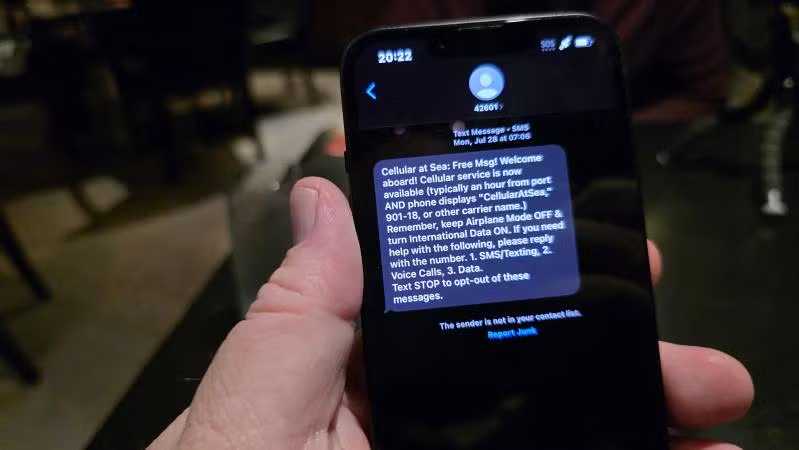
When Heather and I took our first cruise years ago, connectivity was simple: we couldn't afford $7-per-minute phone calls, so we disconnected! Today's first-time cruisers face more complex decisions, including the cost of ship Wi-Fi packages ($16-40/day), cellular day passes from AT&T and Verizon ($20/day), and Cellular at Sea Cruise+ eSIM for folks with other services such as T-Mobile. After helping hundreds of first-time cruisers who have contacted us for assistance here and hearing feedback from Heather's clients at Flow Voyages, I've learned that most new cruisers make one of two mistakes: over-buying expensive unlimited packages they barely use, or skipping connectivity entirely and spending the cruise anxious about emergencies at home. The right answer sits somewhere between, based on five key factors. Thankfully with Cellular at Sea Cruise+ there are affordable options that work for most budgets so you can stay connected on a cruise. This first question determines whether connectivity is optional or essential to your family's happiness. You're the emergency contact for elderly parents or family members with health issues. On my Canada & New England cruise earlier this fall, I needed reliable connectivity because Heather stayed home to care for her dad. Being completely unreachable wasn't an option. You work remotely or have business that can't pause for a week. You have school-age children at home with caregivers. You're managing time-sensitive situations like home renovations, legal matters, or medical issues. Why we picked it: adults-only, with tips and most dining included. Promoted by FlowAds You're taking a true vacation where work and family can manage without you. Nobody's health or business depends on immediate availability. You actively want to disconnect as part of the vacation experience. Light connectivity to check in once daily, confirm everything's fine, and be available if urgent situations arise. This doesn't require expensive unlimited packages - it might only need cellular day passes on sea days or occasional port Wi-Fi access. First-time cruisers overestimate internet use because they think about normal daily routines. Cruise life works differently. Wake up, breakfast, shore excursion or ship activities (fitness class, cooking demo, trivia), lunch, more activities or pool relaxation, dinner (1-2 hours), evening entertainment. Notice the minimal downtime for scrolling social media or browsing news? Ships design your days full of experiences that don't involve staring at phones. "I bought unlimited thinking I'd use it constantly. I checked email twice the whole week." "The basic social plan was plenty - uploaded a few photos daily and checked messages." "I used port Wi-Fi when docked to send quick updates. Never felt like I was missing anything." These are comments that we hear from some of our clients after their first cruise and I'm sure most of you can identify with similar sentiment as well. Working remotely part-time during longer cruises. Traveling with teens who genuinely will use the internet constantly. Creating content or maintaining social media presence. Streaming movies in the cabin rather than attending ship shows. Before buying unlimited packages though, think about your last vacation. Did you actually spend hours daily online, or did vacation activities naturally reduce screen time? Most people find usage drops 70-80% compared to home routines. Begin planning cruise connectivity at least two weeks before your voyage. More affordable, accessible options exist now than ever. $20 per 24-hour period includes unlimited calls to US, unlimited texts, and 500MB high-speed data through Cellular at Sea service available on 210+ cruise ships across 25+ cruise lines. These day passes deliver predictability - you know your cost upfront and only pay on days you use service. Cellular connectivity suits moderate data users who plan to make phone calls, send texts, and check email. The encrypted cellular connection provides security for mobile banking and sensitive transactions that shared ship Wi-Fi networks can't match. Contact your cellular provider before sailing to add cruise day pass to your line. Visit cellularatsea.com to confirm your ship offers service and explore connectivity options based on your usage profile. This eSim option is something available to anyone with an unlocked phone but it is especially good for passengers whose cellular providers don't yet offer data services at sea - including T-Mobile customers and prepaid plan users. Cellular at Sea Cruise+ eSIM enables connectivity both at sea and on land. This data-only service works through eSIM provisioning on compatible devices. Fixed data packages range from 512MB to 10GB covering cruise duration plus pre-cruise and post-cruise time. Cruise lines offer tiered packages ($16-40/day) best suited for heavy data users requiring high-bandwidth applications like streaming video. Ship Wi-Fi and cellular connectivity serve complementary purposes - two separate offerings with distinct advantages. Turn on international roaming before setting sail. Keep Airplane Mode off so cellular connectivity can be enabled. Turn Wi-Fi off in phone settings while using cellular data. Many first-time cruisers don't realize some cruise lines bundle Wi-Fi into certain fare types. Most luxury cruise lines include Wi-Fi in their fares as a standard amenity. Viking Ocean Cruises, Oceania Cruises, Silversea, Regent Seven Seas, and Seabourn all bundle internet connectivity into their premium pricing. If you're considering a luxury cruise, verify Wi-Fi inclusion with your travel agent, but you'll likely find it already covered in your fare. Check cruise documents for "internet included" in fare details. Call your cruise line or travel agent and explicitly ask if any connectivity is already included. Many first-timers waste money buying Wi-Fi they already had. Even if you skip ship Wi-Fi, first-timers should have backup plans for important connectivity needs. Most ports offer free or inexpensive Wi-Fi at cruise terminals (often free for 30-60 minutes), port-side cafes, McDonald's/Starbucks, and shopping malls. On 7-day cruises with 4 port days, you could check email each port day without buying ship packages. You don't need to activate day passes every day. Activate only when you need connectivity. Example: Skip ship Wi-Fi initially. On day 3 at sea, something requires internet access. Activate one day of cellular service ($20), handle the situation, don't activate again. Total cost: $20 instead of $150+ for weekly ship Wi-Fi. During my Canada New England cruise, I tested AT&T International Day Pass during a Halifax shore excursion. My phone seamlessly switched from the ship's Cellular at Sea network to local Canadian networks as we departed the ship. Walking through Halifax's waterfront district, I sent messages to Heather, checked directions to our lunch spot, and uploaded photos - all covered by the same $20 day pass that worked both at sea and on land that day. The Cellular at Sea Cruise+ eSIM worked identically during our time exploring Saint John, New Brunswick, automatically connecting to local networks without any manual configuration. First-time cruisers rarely consider security, but it matters if you'll access sensitive information. Protecting your computer while on a cruise is more than just about making sure you don't drip that drink on your keyboard! Accessing bank accounts, paying bills, and making financial transactions. Managing investments or trading stocks. Monitoring credit cards for fraud. Working remotely requires VPN access to protect your privacy. After an Alaska cruise where someone hacked my bank account and stole thousands while I was using ship Wi-Fi for banking, I'm cautious about using shared networks for financial activities. Ship Wi-Fi operates as a shared public network where thousands of passengers connect to the same infrastructure. Cellular service via cruise day passes or Cruise+ eSIMs provides encrypted connections from your phone to the ship's Cellular at Sea antenna system - more secure than shared Wi-Fi for banking and sensitive transactions. Use cellular service via cruise day passes or eSIMs for sensitive activities (banking, investments). Use ship Wi-Fi for general activities (social media, news, entertainment). This hybrid approach provides security where it matters without requiring expensive connectivity for everything. If you'll access financial accounts during cruise, budget for 1-2 days of cellular connectivity via day passes ($20-40 total) or an eSIM data package for secure transactions even if you use ship Wi-Fi for general internet. Match your connectivity plan to your actual usage patterns and reachability needs instead of buying based on assumptions about how much you'll use the internet. Essential reachability + moderate use: Pre-purchase ship Wi-Fi basic tier ($18-25/day, total $126-175 for 7 days) OR cellular day passes only on sea days if port-intensive itinerary ($40-60 for 2-3 sea days). Optional connectivity + light use: Ship Wi-Fi social tier ($16-19/day, total $112-133) OR port Wi-Fi plus occasional cellular day pass ($20-40 selective use). True disconnect + emergency backup: No pre-purchased Wi-Fi, use port Wi-Fi for check-ins, have Cellular at Sea Cruise+ day pass available if needed (total $0-20). Working remotely + heavy use: Ship Wi-Fi premium unlimited tier ($26-40/day, total $182-280) for consistent high-bandwidth streaming and work requirements. The test question: "If I had no internet for 7 days, would anything bad happen?" If yes, buy connectivity. If no, consider port Wi-Fi plus backup plans. Money-saving tips: Always pre-purchase if buying (saves 15-30%). Start with lower tier - you can upgrade onboard but can't downgrade. Check port schedules - port-intensive itineraries offer more free Wi-Fi opportunities. Consider cruise length - 3-4 days without connectivity is manageable, 10-14 days feels harder. Most first-time cruisers either over-buy expensive packages they barely use or skip connectivity and end up anxious for the duration of the cruise. The right answer depends on five factors: reachability needs (essential vs. optional), actual usage (ship activities reduce screen time 70-80%), included connectivity (check your fare first), backup plans (port Wi-Fi and cellular day passes provide safety nets), and security considerations (use cellular for banking, ship Wi-Fi for entertainment). If you're like most people, you don't have an unlimited budget and money spent on staying connected to the Internet at sea is money that you can't spend on shore excursions, shopping, drinks, and specialty dining. Ship Wi-Fi and cellular connectivity serve complementary purposes so this isn't entirely about going with the cheapest option. Ship Wi-Fi works best for heavy data users streaming video and requiring high-bandwidth applications. Cellular day passes from AT&T and Verizon ($20/day) and land and sea-based eSIMs like Cellular at Sea Cruise+ suit moderate users making calls, sending texts, and checking email with encrypted security for banking. T-Mobile customers and other carriers without day pass agreements can use Cellular at Sea Cruise+ eSIM for data connectivity at sea and on land. Visit cellularatsea.com at least two weeks before sailing to confirm your ship offers service and match your usage profile to the right connectivity option. For complete first-cruise planning including connectivity decisions, contact Heather Hills and our team at Flow Voyages. Thanks for reading. We hope this was helpful! Why stop now? Play Some Cruise Games | Ask or Answer A Cruise Question | Contact Heather to Book Your Next Cruise!
Do You Need to Stay Reachable for Work or Family?
When Connectivity is Essential
Cruise Pick of the Month

Virgin Voyages Mexican Riviera, October 2027

When Connectivity is Optional
The Middle Ground Most First-Timers Choose
How Much Will You Actually Use Internet?
What Happens on Actual Cruise Days
Reality from First-Time Cruisers
Exception - When You WILL Use Internet Heavily
Understanding Your Connectivity Options
Cellular At Sea Cruise+ Day Passes (AT&T and Verizon Customers)
Cellular at Sea Cruise+ eSIM (T-Mobile and Other Carriers)
Ship Wi-Fi Packages
Tips for Optimal Cellular Data Usage
Is Wi-Fi Already Included in Your Fare?
Before Buying Any Package
What's Your Backup Plan?
Port Wi-Fi Options
One-Off Cellular Day Pass Purchase
Testing Cellular on Shore Excursions

Security Considerations
When Security Influences Decisions
The Security Difference
Practical Security Approach
Making Your Decision

Choosing the Right Connectivity Option Without Overspending ...


